How it works
What happens between typing "move the milestone" and the plan changing — the assistant reads the plan, proposes the write, shows you the cascade, and only then applies it. Every step, with undo.
shadow-planner's chat assistant isn't a chatbot bolted onto a Gantt chart. It reads and writes the same plan you see, through a fixed set of tools, and every risky write pauses for your approval. Here is one request end to end: moving a milestone.
Step 1 — You ask
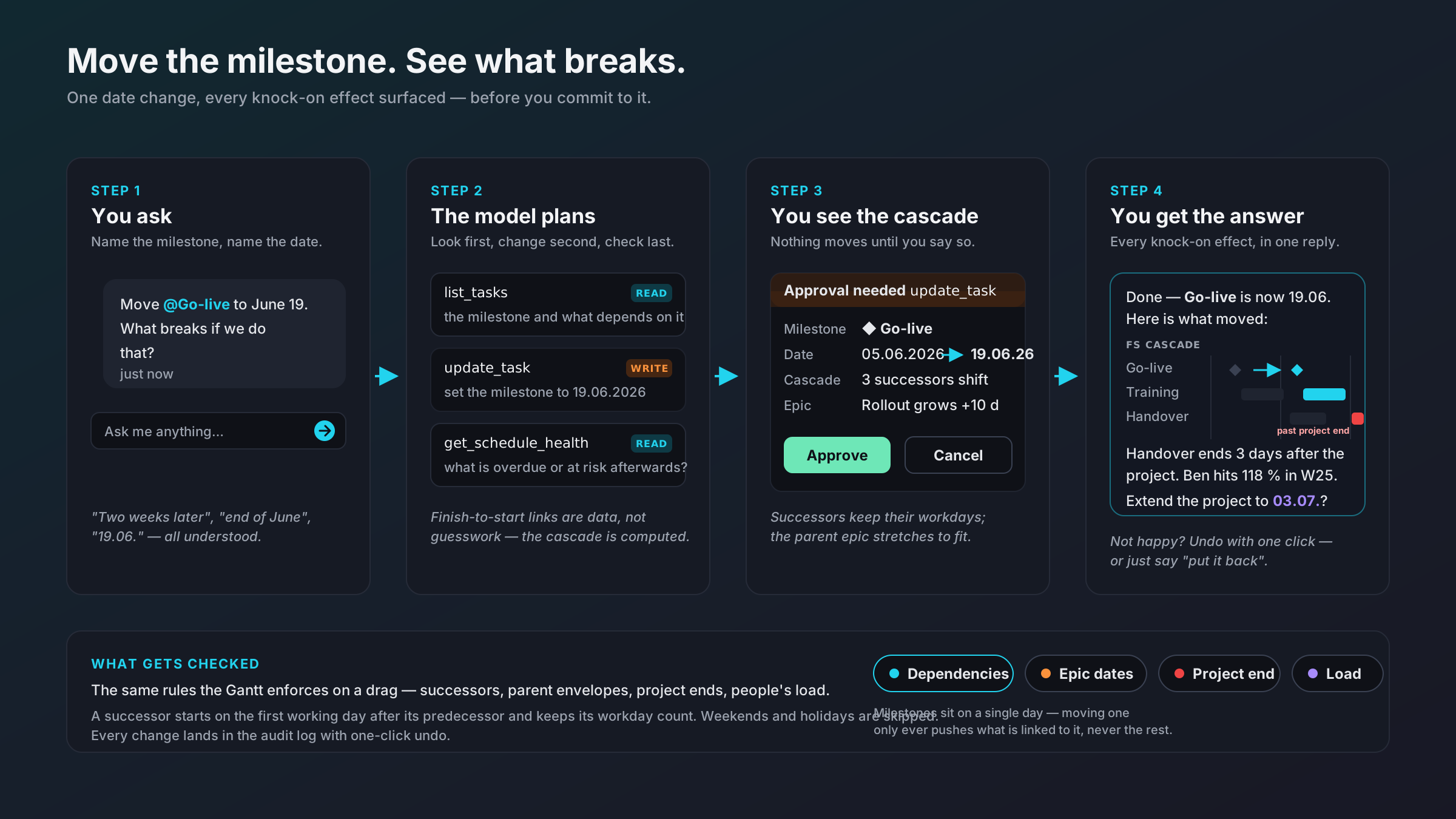
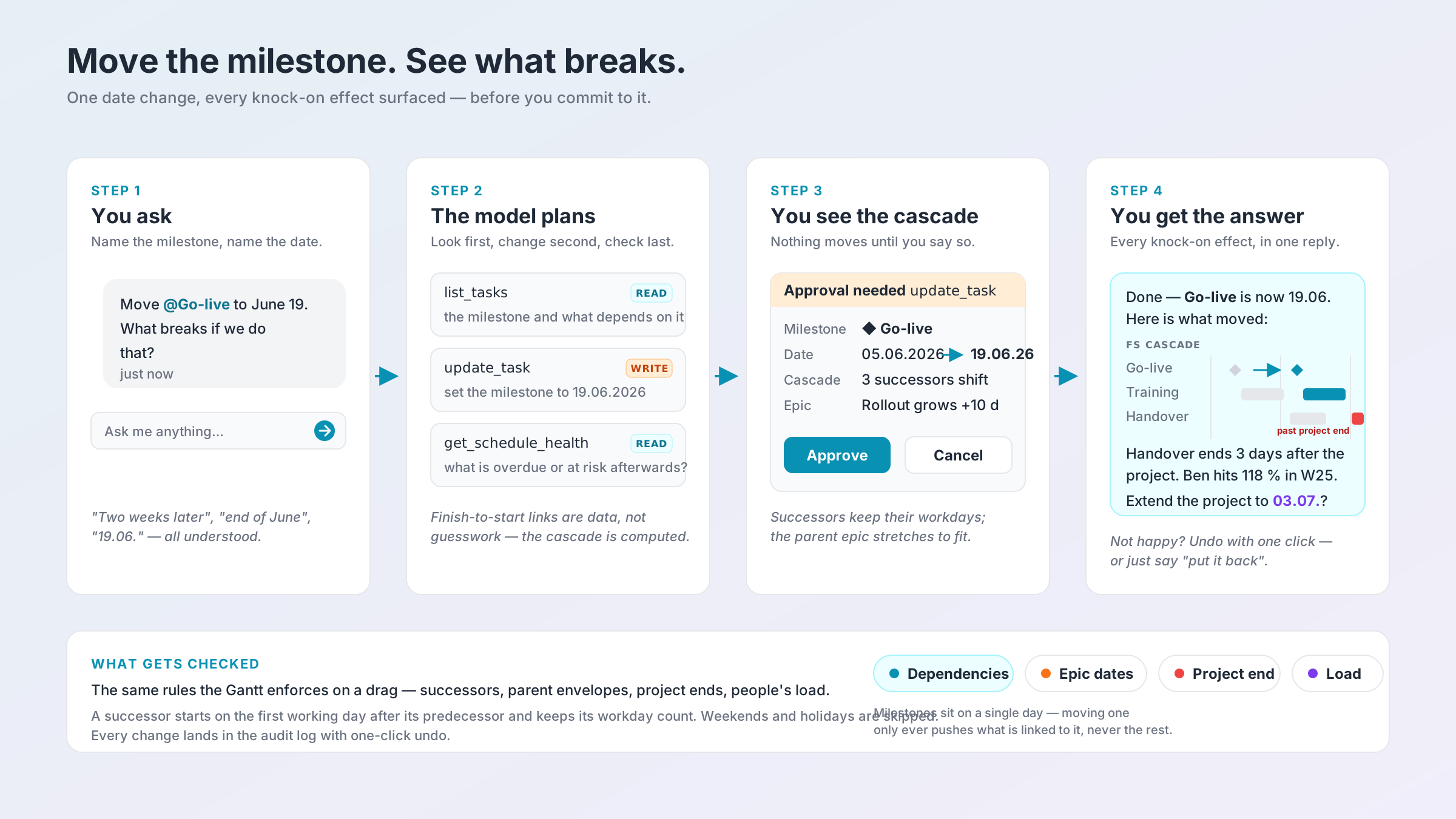
"Move @Go-live to June 19. What breaks if we do that?"
Type @ to pick the exact milestone, person or project from an autocomplete, so the assistant works on the entity you meant rather than a name it guessed. Dates can be as loose as you like — "two weeks later", "end of June", "19.06." all resolve against your scenario's calendar.
The chat is scoped to the active scenario. Whatever you ask, it only ever touches that one plan.
Step 2 — The model plans
The assistant cannot edit the database freely. It works through tools, and it chooses them in a fixed rhythm: look first, change second, check last.
list_tasks— a read: fetch the milestone and everything that depends on it.update_task— a write: set the milestone to the new date.get_schedule_health— a read: what is overdue or at risk afterwards?
Every tool call shows up in the transcript as it happens, tagged READ or WRITE, so database changes are never invisible. Finish-to-start links are data, not guesswork: the cascade is computed by the same engine that handles a drag on the Gantt.
Step 3 — You see the cascade
Simple creates and updates apply directly. But when a change would ripple — shifting successors, stretching a parent epic, pushing past the project end — the assistant stops and shows an approval card:
- Milestone: ◆ Go-live
- Date: 05.06.2026 → 19.06.2026
- Cascade: 3 successors shift
- Epic: Rollout grows +10 days
Approve applies the change and its knock-on effects as one operation. Cancel applies nothing — not even the original date change. There is no halfway state.
The same pause happens for deletes (with a count of what goes with them) and bulk changes (with the exact list of affected items).
Step 4 — You get the answer
The reply isn't "done". It's what moved, and what that means:
- Training and Handover shift forward, keeping their workday counts.
- Handover now ends three days after the project's end date.
- Ben hits 118 % load in week 25.
- A suggestion: extend the project to 03.07.?
Not happy? Undo with one click in the Gantt toolbar, or just say "put it back". AI changes sit on the same undo stack as your own, and one undo reverts the whole cascade at once.
What gets checked
The chat enforces the same rules the Gantt enforces when you drag a bar:
- Dependencies — a successor starts on the first working day after its predecessor and keeps its workday count. Weekends and public holidays are skipped.
- Epic dates — a parent epic or project auto-extends so it always encloses its children, and tells you when it did.
- Project end — anything pushed past the project's end date is flagged, not silently allowed.
- Load — resource utilisation is recalculated, so an overbooked week surfaces in the answer.
Milestones sit on a single day. Moving one only ever pushes what is linked to it, never the rest of the plan.
Everything is on the record
Every write — yours, the chat assistant's, the planning agent's — lands in the audit log with who, what, when, and for AI actions why: the tool used, an excerpt of your prompt and of the model's reasoning. Approvals are cross-referenced on the entries they authorised.
Where the model runs
All of this works with a local model via Ollama — the default, and nothing leaves your machine. If you want a stronger model for complex requests, plug in your own Anthropic, OpenAI or OpenRouter key. Only the conversation goes to the provider; your database never does. Details in Connect an AI provider.
Read on
- The chat assistant — @-mentions, slash commands, and every approval rule.
- Plan a project with AI — how a written brief becomes a full draft plan.
- Undo, history & the audit log — what can and can't be undone.