

Resource utilisation planning: see who's overloaded before it hurts
shadow-planner's utilisation view compares each person's weekly capacity against their allocations across every project, highlights over-capacity weeks, and rolls up cost from daily rates — no spreadsheet required.
Projects rarely fail because of one bad estimate. They fail because the same three people were quietly allocated 140% across four projects and nobody had a view that showed it. shadow-planner's resource utilisation view is that view.
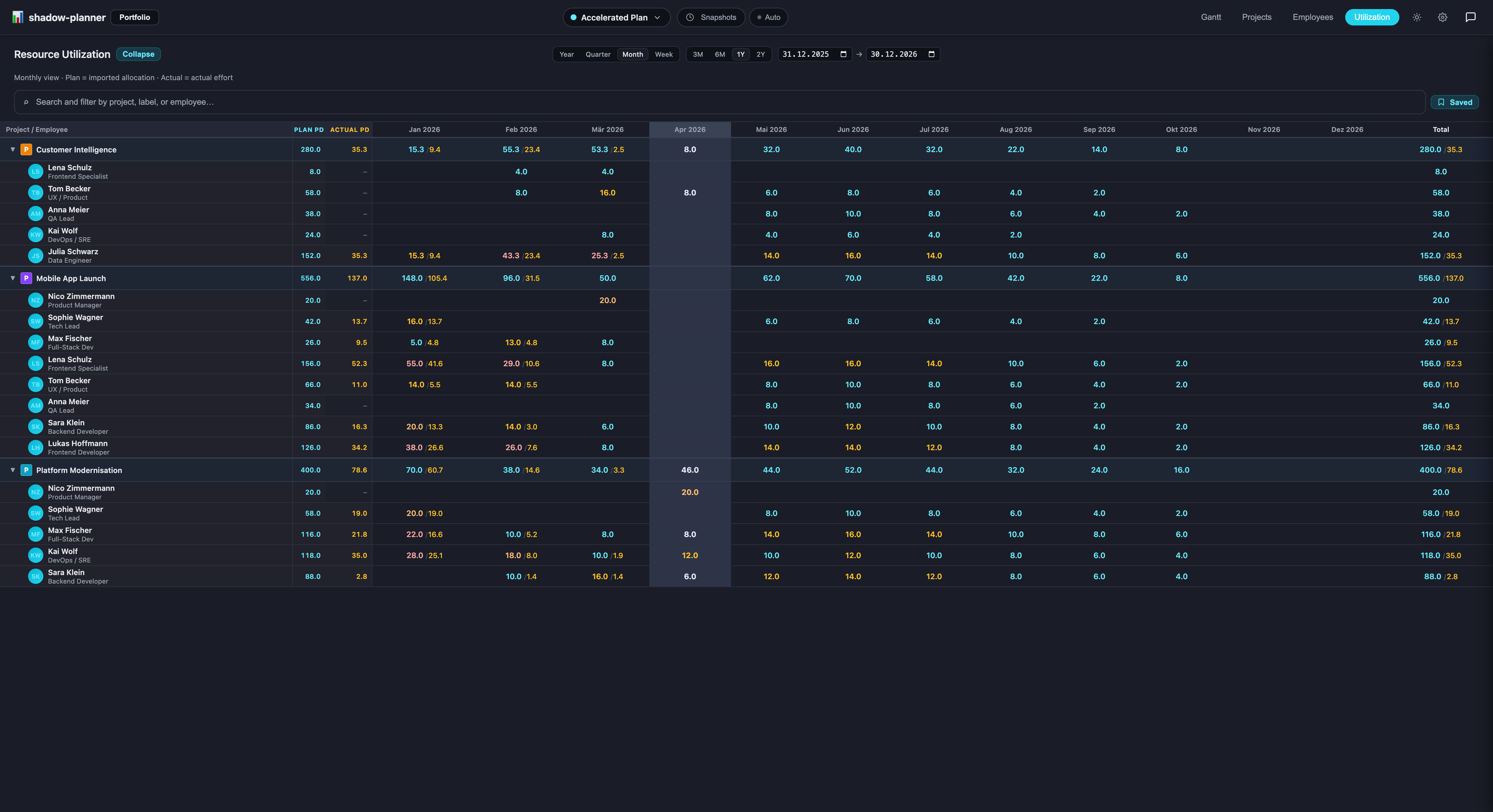
Capacity versus allocation, week by week
Every resource has a configured capacity (available hours per day) and a daily rate. The utilisation view puts capacity next to the sum of their allocations across all projects in the scenario:
- Per-week cells show the allocation percentage; over-capacity weeks are highlighted.
- Per-project bars show where each person's time goes.
- Sliders adjust allocations in place — no round trip to a project page.
- Actuals and preliminary actuals (imported from allocation CSVs) sit next to plan, with preliminary values marked so you know which numbers are still moving.
- Saved filters narrow the view to a label, a project group or a team, and work in the Gantt too.
Cost without the spreadsheet
Because rates live on the resource, cost is a roll-up, not a formula you maintain. The portfolio view shows cost, person-days and RAG status per project on one screen; the epic detail page shows progress and the top bookers for that piece of work.
Test a staffing change safely
Wondering whether pulling two people off Project B to rescue Project A actually works? Copy the baseline into a scenario, move the allocations, and compare the utilisation heatmaps side by side. The team's real plan doesn't move until you decide. More on that in what-if scenarios.
Ask instead of scanning
The chat assistant reads the same data:
"Who is over capacity in March?"
"Rebalance Ben's allocation on Atlas down to 50% and tell me what that does to the finish date."
"Show me Chloé's utilisation."
Changes to existing allocations pause for your approval before they're saved.
Getting your team in
Import resources from an Excel file — names, capacity, rate, manager — and group them with free-form labels (team, location, skill). Model the resource-manager hierarchy so the view matches how your organisation actually reports.
Utilisation is part of the free tier (up to 3 resources; unlimited for €4,99 once). Install shadow-planner.