
How to draft a full project plan from a brief — with a local LLM
A step-by-step walkthrough of turning a one-page Markdown brief into epics, tasks and assignments using shadow-planner's planning agent and Ollama, without sending anything to the cloud.
Most "AI project planning" tools work the same way: you type into a chat box, the text goes to someone else's server, and a plan comes back. That's fine for a hobby project. It's a non-starter when the brief contains client names, budgets or unreleased products.
shadow-planner takes a different approach. The planning agent runs against whatever model you point it at — and the default is a local Ollama install, which means the brief never leaves your machine. Here's the whole flow, end to end.
1. Install Ollama and pull a model
Ollama runs on Windows, macOS and Linux. Once installed, pull a model that handles structured output well. On a laptop with 16 GB of RAM, an 8B-parameter model is a good starting point:
ollama pull qwen3:8b
Bigger models produce better plans from vaguer briefs; smaller ones are faster. You can switch at any time.
2. Point shadow-planner at it
On first launch shadow-planner opens a setup wizard. Choose Ollama (local), pick the model you just pulled, and hit Test connection. That's it — no API key, no account.
If you'd rather use a cloud model, the same wizard takes an Anthropic, OpenAI or OpenRouter key. The rest of this guide is identical either way.
3. Write the brief
The planning agent takes a Markdown brief. It doesn't need to be polished; it needs to contain the facts a human planner would ask for. A useful skeleton:
# Mobile app relaunch

**Goal:** Replace the legacy iOS/Android apps with a single cross-platform app
by end of Q1.

**Team:** Anna (PM, 50%), Ben and Chloé (developers), Dev (QA, from February).

**Phases**
- Discovery and design — 3 weeks
- Build — 8 weeks, API work must finish before UI integration
- Beta with 200 users — 2 weeks
- Store submission and launch

**Constraints:** Nothing ships over the holidays. Ben is out the first
two weeks of January.
Phases become epics. Bullet points under them become tasks. Names you mention get matched to resources in your scenario, and dependencies you state in prose ("API work must finish before UI integration") become finish-to-start links.
4. Review the draft — nothing is saved yet
Paste the brief into the Planning Wizard and run it. The agent returns a structured proposal: projects, epics, tasks with dates, and assignments, rendered as a preview. Nothing is written to your database at this point.
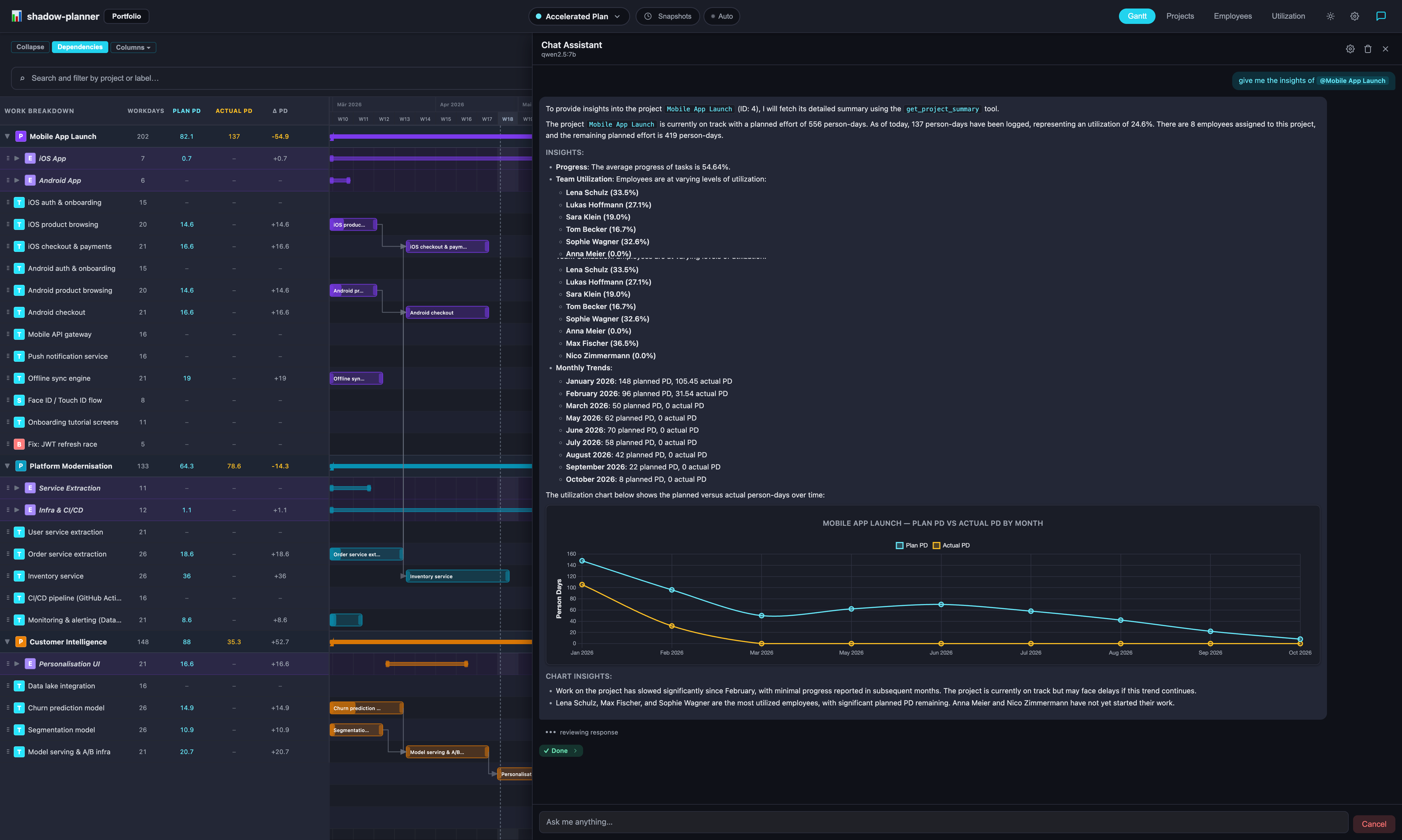
Read it like you'd read a junior PM's first draft. Dates too optimistic? Missing a phase? Edit the brief and re-run, or materialise the draft and fix the details in the Gantt chart — whichever is faster.
5. Materialise and refine in chat
Click Materialise and the plan lands in your active scenario. From here the chat assistant takes over for day-to-day steering:
- "Push the beta out by one week and show me what moves."
- "Who is over capacity in February?"
- "Add a task 'App Store screenshots' under Store submission, assigned to Anna, 2 days."
Every change that touches existing data — deletes, bulk updates, date shifts that cascade — pauses with a preview card until you approve it. You stay in control; the model does the typing.
6. Keep the original as a snapshot
Before the first big replanning session, take a snapshot of the scenario. Later you can put the current plan next to where it started and see exactly what drifted. If this kind of project comes up again, save the scenario as a template and bootstrap the next one in seconds.
Why local matters
Running the model locally isn't only about privacy. It also means:
- No per-token cost. Iterate on the brief ten times; it's free.
- Works offline. On a train, at a client site with no guest Wi‑Fi, wherever.
- The data never becomes training data. Nothing is sent, so nothing can be retained.
If you need a stronger model for a complex brief, switch the provider to Claude or GPT for that one run and switch back. Only the chat messages and the brief are sent — never your database.
Install shadow-planner — it's free, and the planning agent is included in the free tier.